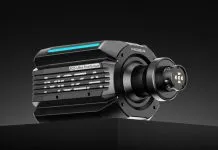
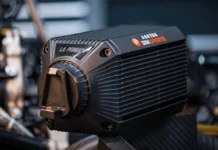
The Fanatec Podium DD is a great wheelbase, but it can be even better when configured to your personal preferences.
In this article, we summarize some of the key documentation published by Fanatec regarding the configuration of the Podium DD. If you want to learn more, check out our full review by clicking this link.
TUNING MENU PARAMETERS
SEN (SENSITIVITY)
- Standard SEN range: 180 … 1080 – AUTO SEN default: AUTO
- Advanced SEN range: 90 … 2520 – AUTO SEN default: AUTO
Sensitivity defines the degrees of rotation. If SEN is set to 90 the steering wheel can only be turned 90° (45° left and 45° right from the calibrated centre position). If SEN is set to 2520 the steering wheel can be turned 2520° (1260° left and 1260° right from the calibrated centre position). If SEN is set to AUTO, the sensitivity is controlled by the PC driver or directly by the game (if it supports the feature).
FF (FORCE FEEDBACK)
- Standard FF range: 005 … 100 – FF default: 100
- Advanced FF range: OFF 001 … 100 – FF default: 100
Force Feedback defines the maximum strength of the motor when force feedback effects from software / games are sent to the wheel base. If FF is set to OFF, there will be no force feedback effect executed by the wheel base motor. If FF is set to 001, the motor will execute only 1% of the maximum motor power. If FF is set to 100, the motor will execute 100% of the maximum motor power. The final torque output is influenced by several factors, including the force feedback modifiers (see below), and the in-game settings. For stronger feedback, it is better to run a higher ‘FF’ value in the Tuning Menu rather than turning up the in-game strength value (to avoid clipping).
FUL (FULLFORCE STRENGTH)
- FUL range: OFF … 100 – FUL default: 100
When supported by a game, FullForce adds a layer of high-fidelity vibrations to the core force feedback signal. OFF will result in no vibration effects. 100 will produce the highest intensity output. The availability and feel of the effects can very depending on game implementation.
NDP (NATURAL DAMPER)
- Standard NDP range: 25 … 100 – NDP default: 50
- Advanced NDP range: OFF 01 … 100 – NDP default: 50
Natural Damper provides additional damping which can be adjusted from OFF to 100. 100 will have the strongest damping effect which reacts to the acceleration and angle of your steering. If turned OFF, your steering will have no additional damping, making it easier to turn the steering wheel. Natural Damper is useful for controlling the speed of the wheel during oversteer, and also helps to reduce wheel oscillation. Oscillation is typically caused by latency in the feedback loop, and is more apparent in racing games that are not optimised for high-torque motors. The default value of 50 provides a balance between steering responsiveness and oscillation mitigation.
NFR (NATURAL FRICTION)
- NFR range: OFF 001 … 100 – NFR default: OFF
Natural Friction is used to simulate the mechanical feel of steering components. A higher setting results in more resistance when rotating the steering wheel. This can enhance the feeling of driving vehicles without power steering, or with very wide tyres. This setting may also help prevent oscillation.
NIN (NATURAL INERTIA)
- NIN range: OFF 001 … 100 – NIN default: OFF
Natural Inertia simulates additional steering weight. This can be particularly useful when using lighter steering wheels such as steering wheels from our CSL Elite / CSL range. Additionally, the Natural Friction setting is smoothed on direction changes.
INT (FFB INTERPOLATION)
- INT range: OFF 01 … 20 – INT default: 11
FFB Interpolation smooths and interpolates FFB by filtering game output without FFB detail loss. OFF = unfiltered, 01 = lowest filter, and 20 = highest filter.
FEI (FORCE EFFECT INTENSITY)
- FEI range: 000 … 100 – FEI default: 100
Force Effect Intensity adjusts the overall intensity and smoothness of force effects: 000 is the smoothest. 100 is the sharpest and most direct. Tuning this parameter can refine harsh or spiky force feedback signals in some games.
FORCE / SPRING / DAMPER EFFECT
- FOR range: OFF 010 … 120 – FOR default: 100
- SPR range: OFF 010 … 120 – SPR default: 100
- DPR range: OFF 010 … 120 – DPR default: 100
These FFB modifiers allow you to change the FFB signals of a game (only applicable if games support these effects). Theoretically, there are three signal types which a game can send. Force (forces the steering wheel in a specific direction). Spring (pulls the steering wheel towards the dynamic centre). Damper (creates friction)
NOTE: Not every game uses all three types of effects and some games use only one type to create all three effects. Additionally, SPRING is used by some games to centre the wheel when pausing and in menus.
IMPORTANT: If Spring is adjusted to low values or OFF, the wheel base will not be able to move the attached steering wheel to the correct centre position after a centre calibration is performed. Only adjust these values higher than 100% if the FFB effects are not strong enough and weaker in comparison to other games. Raising one or more of these values may result in higher load on the motor and increase heat generation.
BLI (BRAKE LEVEL INDICATOR)
- BLI range: 001 … 100 – OFF BLI default: OFF
Values from 001 to 100 sets the activation point for brake pedal vibration (only available when ClubSport Pedals V3 / V3i is connected). This feature works independently and therefore can be used with any game. It is useful for learning threshold braking technique. OFF allows pedal vibration to be controlled by a game directly (if supported).
SHO (SHOCK / VIBRATION STRENGTH)
- SHO range: OFF / ON – SHO default: ON
The strength of the shock / vibration inside a Fanatec steering wheel and pedal set which features vibration motors can be set to either OFF or ON. These vibration motors can be used directly by the game if supported.
iRacing In-Game Configuration
Fanatec advises the following values for the Fanatec App configuration:
- SEN: 1080
- FFB: 80
- NDP: 15
- INT: 3
While within the iRacing sim you can set the following:
- Strength: 5
- Min Force: Off
- Damping: 0
- Use Linear Mode: On
- Reduce force when parked: Off
- Wheel Force: 25
And that would be all. Of course, these are what Fanatec says, not what you could consider meeting your expectations or your tastes. Dial it to your own preferences.
You can buy this Fanatec Podium DD with shipping included at the official store:
This website uses affiliate links which may earn a commission at no additional cost to you.