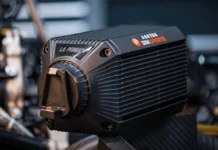
In my review of the Moza Racing R21 Ultra base, I pointed out that enabling the WLFE effects could cause some rather alarming noises.
Here we are to clear up the issue and make sure we can continue using our bases in the best possible way. Moza has given us the official solution after asking them about the doubts surrounding the WLFE effects that were enabled in an iRacing update a few months ago. If you turn them on without following these steps, the sounds coming from the bases are awful and worrying — to the point that I could barely test WLFE with audio.
Why does my wheelbase vibrate at a high frequency and make abnormal noises after the iRacing update?
iRacing 6.10 updated version supports 360hz and Wheel LFE effects for MOZA devices
Software Compatibility Requirements:
- Base Firmware Version: ≥ 1.2.5.5
- Pit House Version: ≥ 1.3.1.50
Hardware Compatibility Requirements:
All MOZA bases support 360Hz and Wheel LFE function.
Note: The game automatically enables both features by default. You can manually disable them if preferred.
How to Configure in Game:
360Hz:
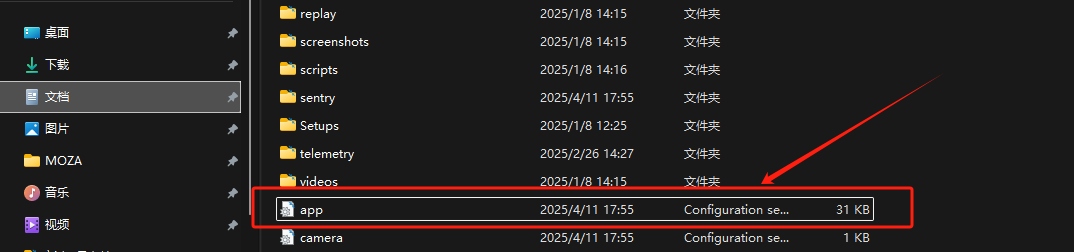
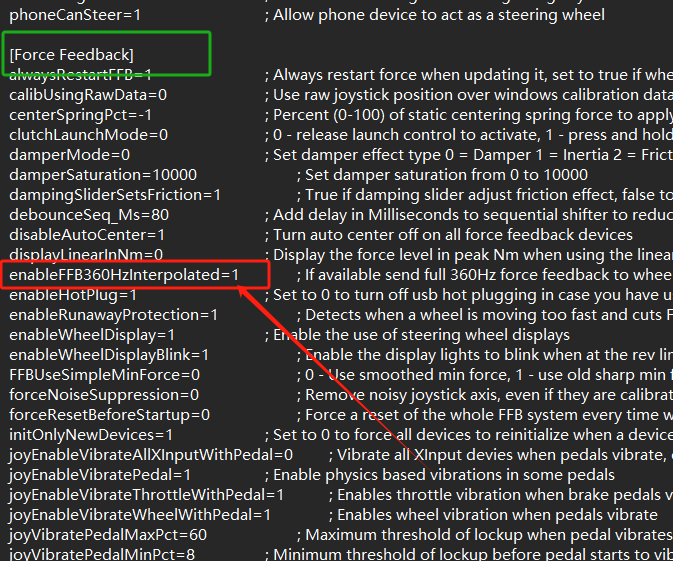
- Locate the app.ini configuration file at: Documents\iRacing\app.ini
- Open the file and search for ‘enableFFB360HzInterpolated’.
- Set the value to 0 to disable the 360Hz feature: enableFFB360HzInterpolated=0
Wheel LFE:
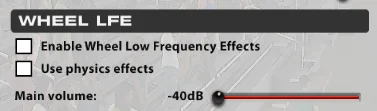
1.This effect can be directly reduced or disabled through the in-game settings interface.
2.To reduce the gain of specific effects, adjust them in the app.ini file located at Documents\iRacing\app.ini.
Find the [TrueForce] section and modify the following parameters:
[TrueForce]
volTrueForcePhysCarBodyAccel_dB=0.000000; How much to duck or raise volume of the car body acceleration TrueForce style effects, in Decibels

volTrueForcePhysDriveShaft_dB=0.000000; How much to duck or raise volume of the drive shaft TrueForce style effects, in Decibels

volTrueForcePhysEngineRPM_dB=-9.000000; How much to duck or raise volume of the engine rpm TrueForce style effects, in Decibels

volTrueForcePhysGearChange_dB=3.000000; How much to duck or raise volume of the gear change TrueForce style effects, in Decibels

volTrueForcePhysRevLimit_dB=0.000000; How much to duck or raise volume of the rev limit TrueForce style effects, in Decibels

volTrueForcePhysRoadTexture_dB=0.000000; How much to duck or raise volume of the road texture TrueForce style effects, in Decibels

volTrueForcePhysRumbleStrip_dB=-3.000000; How much to duck or raise volume of the rumble strip TrueForce style effects, in Decibels

volTrueForcePhysWheelSlip_dB=6.000000; How much to duck or raise volume of the wheel slip TrueForce style effects, in Decibels
You can buy the most powerful Moza Racing Wheelbases by clicking here:
- Moza Racing R21 Ultra
- Moza Racing R21 Ultra (SimUltimate)
- Moza Racing R25 Ultra True Torque
- Moza Racing R25 Ultra True Torque (SimUltimate)
This website uses affiliate links which may earn a commission at no additional cost to you.