Update 1.6.0.1 for Project Motor Racing introduces a meaningful change to GT3 behavior: a revised tyre model that alters how on-track temperatures should be interpreted.
For many drivers, this appears as a more dynamic HUD display, particularly in the temperature indicators. However, these fluctuations are not inconsistencies — they reflect a more accurate representation of tyre behavior.
A Fundamental Change: Where Temperature Is Measured
One of the most important adjustments in the update involves the sampling point used for the color-based temperature graphic. Previously, the system relied on a reference less sensitive to momentary changes. Now, the measurement is taken closer to the tyre surface.
From a technical standpoint, this means the visual indicator reacts more quickly to driving events such as:
- Heavy braking
- Sliding or oversteer
- Lockups or wheelspin
- Lateral loads through corners
The result is a far more responsive graphic capable of showing rapid thermal variations that previously went unnoticed.
Surface Temperature: Why the Colors Move So Much
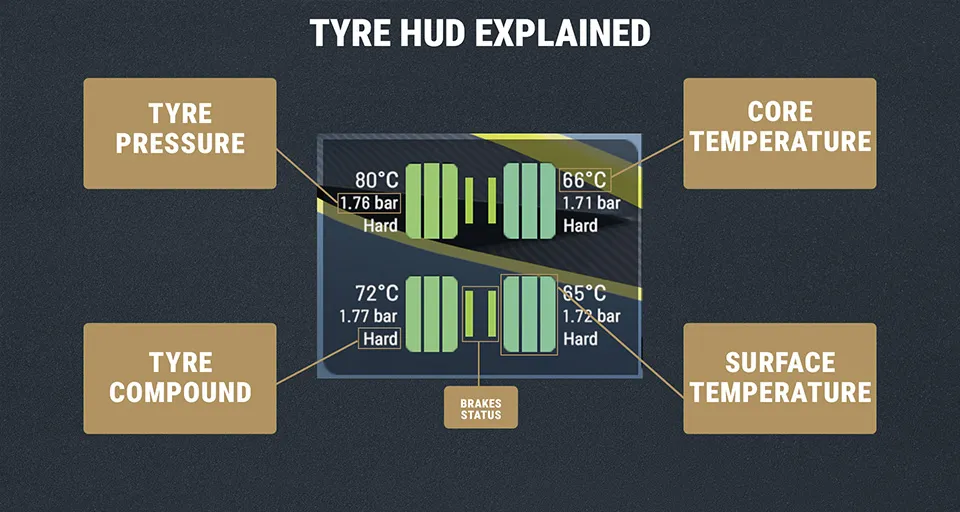
The blue–green–red tyre graphic on the HUD no longer represents a smoothed or averaged temperature. Instead, it reflects a reading taken near the surface of the contact patch. This layer is highly volatile, heating and cooling within seconds depending on driving inputs.
For example, when exiting a corner:
- Friction rapidly increases surface temperature
- Airflow along the following straight cools it just as quickly
This can cause the indicator to drift back toward blue even when the tyre is still performing optimally. Importantly, this does not indicate a loss of grip or efficiency — it is consistent with real tyre physics and heat dissipation.
The update does not make tyres more unstable; it simply visualizes their immediate thermal response with greater precision.
Core Temperature: What the Numeric Value Represents
Unlike the color graphic, the numeric temperature value displayed on the HUD represents the internal or core temperature. This measurement is:
- More stable
- Slower to change
- Indicative of the tyre’s overall thermal state
While the surface reacts instantly, the core reflects sustained operating conditions. As a result, drivers may observe situations where:
- The visual graphic cools quickly on straights
- Core temperature remains within the ideal operating window
Both readings are valid — they describe different layers of the same physical system.
Using Both Readings While Driving
The most effective approach is not to prioritize one measurement over the other, but to interpret them together. Each answers a different question:
Surface Temperature
Helps identify excessive friction or load at specific moments. Sudden spikes often point to:
- Prolonged understeer
- Sliding
- Excessive scrubbing in corners
Core Temperature
Indicates whether the tyre is operating within its optimal thermal range over time.
This distinction becomes particularly valuable in longer stints, where thermal management directly influences wear, consistency, and grip.
Recommended GT3 Operating Window
With the current tyre model, the ideal GT3 temperature range is:
70°C – 95°C (158°F – 203°F)
Keeping the core temperature within this window supports balanced performance and durability. Brief surface fluctuations outside this range are not necessarily problematic.
Practical Implications for Drivers and Setups
From a driving and setup perspective, the revised model suggests several key considerations:
- Rapid color changes should not be treated as immediate warnings
- Core temperature stability is the better indicator of tyre condition
- Surface temperatures help diagnose driving style or setup imbalances
These readings can inform adjustments to:
- Tyre pressures
- Camber settings
- Suspension balance
- Braking and cornering technique
If you want to purchase PMR, there are several options, and you can buy them with a discount by clicking here:
- Project Motor Racing
- Project Motor Racing Year 1 Bundle
- Project Motor Racing Group 5 Revival Pack
- Project Motor Racing GTE Decade Pack
This website uses affiliate links which may earn a commission at no additional cost to you.